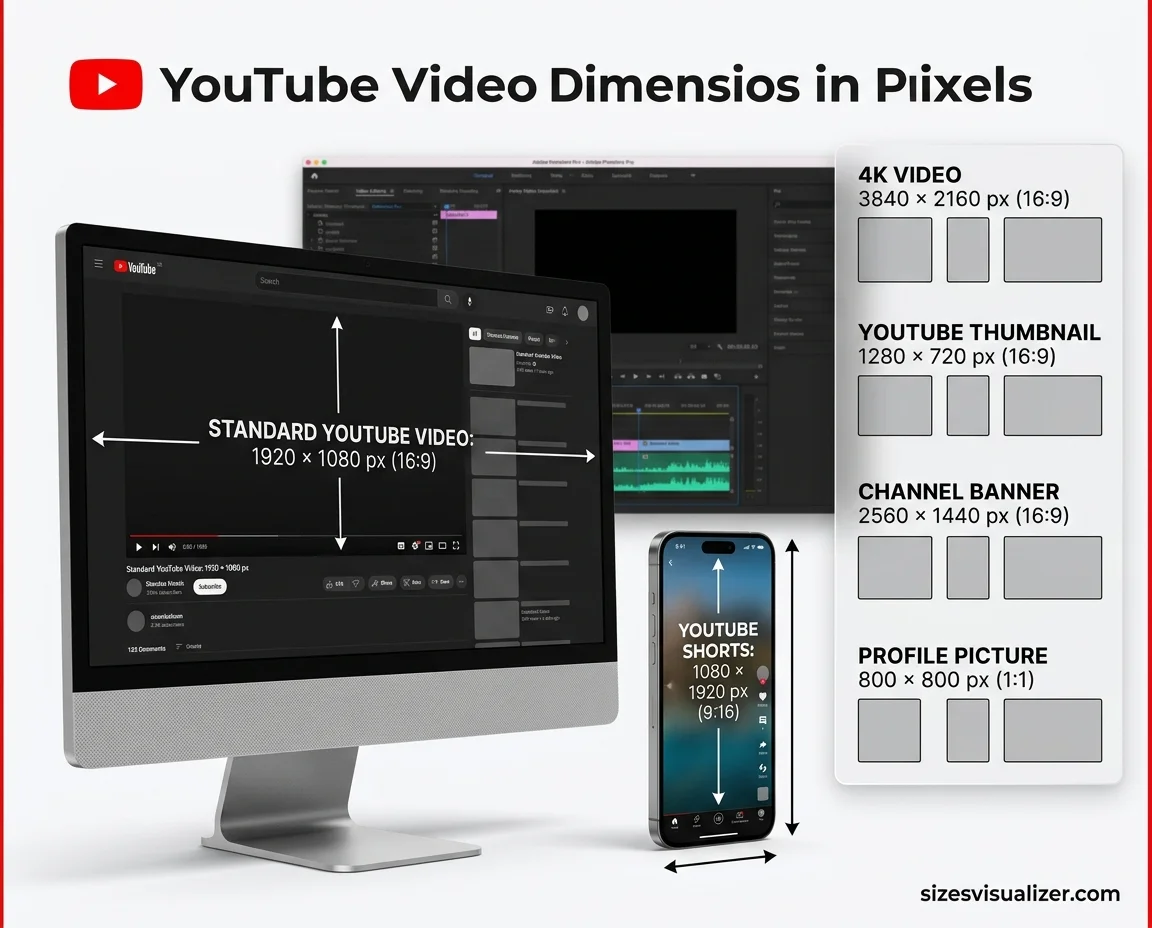
The best YouTube video dimensions in pixels are 1920×1080 for regular videos and 1080×1920 for Shorts. These sizes keep your picture sharp, with no black bars and no odd crops.
This guide gives you a full YouTube resolution chart, every key aspect ratio, thumbnail and banner sizes, and the export settings YouTube recommends. All specs follow YouTube Help and were checked in November 2026.
Table of Contents
YouTube Video Dimensions in Pixels: Quick Size Chart
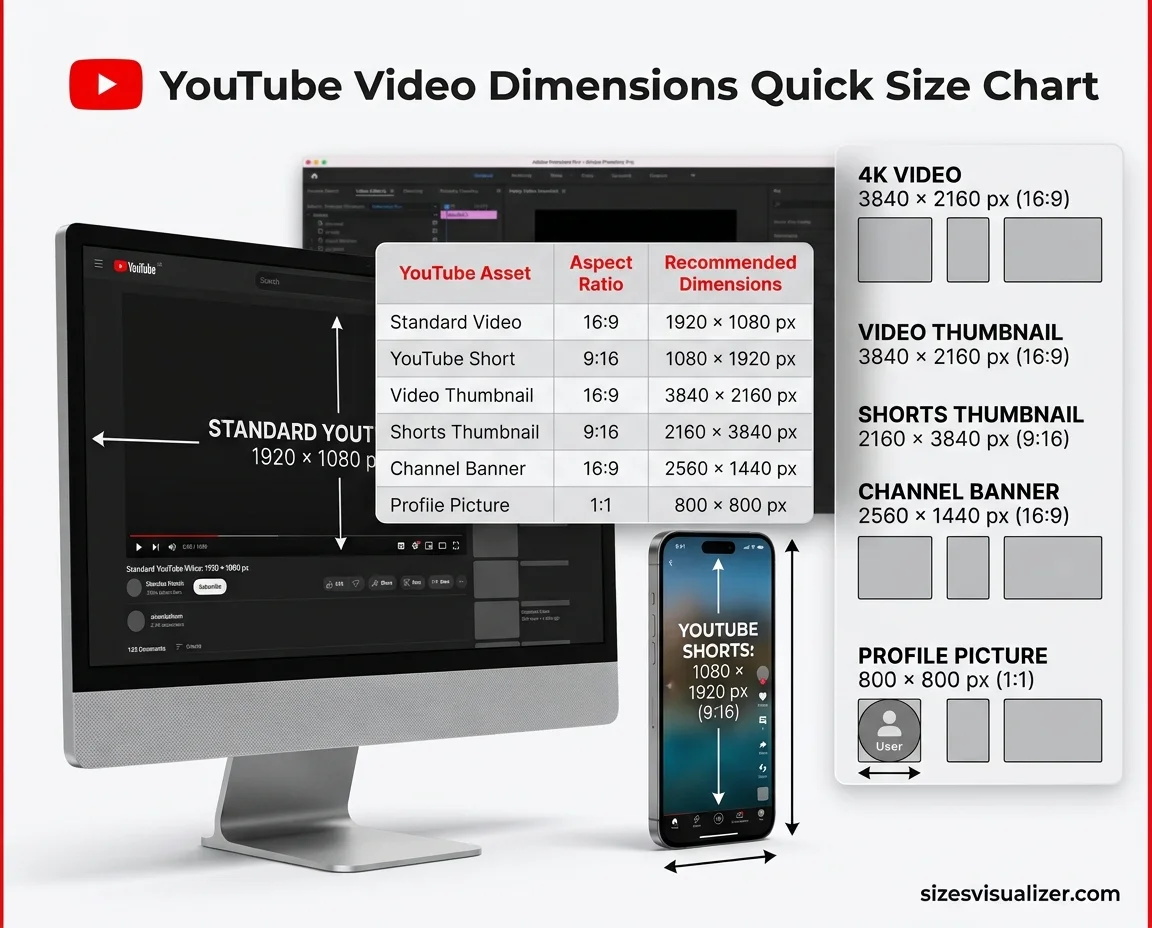
What is the best YouTube video size? For most creators, it is 1920×1080 (Full HD) in a 16:9 ratio. Use the chart below for every other asset.
| Asset | Aspect ratio | Recommended size (px) | Key limit |
|---|---|---|---|
| Standard video | 16:9 | 1920×1080 | Up to 256 GB or 12 hours |
| YouTube Short | 9:16 (or 1:1) | 1080×1920 | Up to 3 minutes |
| Video thumbnail | 16:9 | 3840×2160 (1280×720 still works) | 640 px wide minimum; 50 MB desktop, 2 MB mobile |
| Shorts thumbnail | 9:16 | 2160×3840 | 640 px tall minimum; added on a computer |
| Channel banner | 16:9 | 2560×1440 | 2048×1152 minimum; 6 MB |
| Profile picture | 1:1 | 800×800 | Shown at 98×98 |
Which YouTube video size fits your content? Match the pixel dimensions to what viewers need to see:
- Talking-head and vlog videos: 1920×1080 is plenty.
- Screen recordings and software tutorials: 2560×1440 keeps small menu text crisp.
- Gaming and landscape footage: 1440p or 4K holds fine detail better after compression.
- Shorts: shoot vertical, 1080×1920, from the start.
- Flagship brand films: 3840×2160, because big screens show every pixel.
Big screens matter. Nielsen reported that YouTube captured a record 15.8% of all U.S. TV viewing time in August 2026. Many American viewers now watch on a smart TV, not just a phone.
YouTube Resolution Chart: Pixel Sizes from 240p to 8K
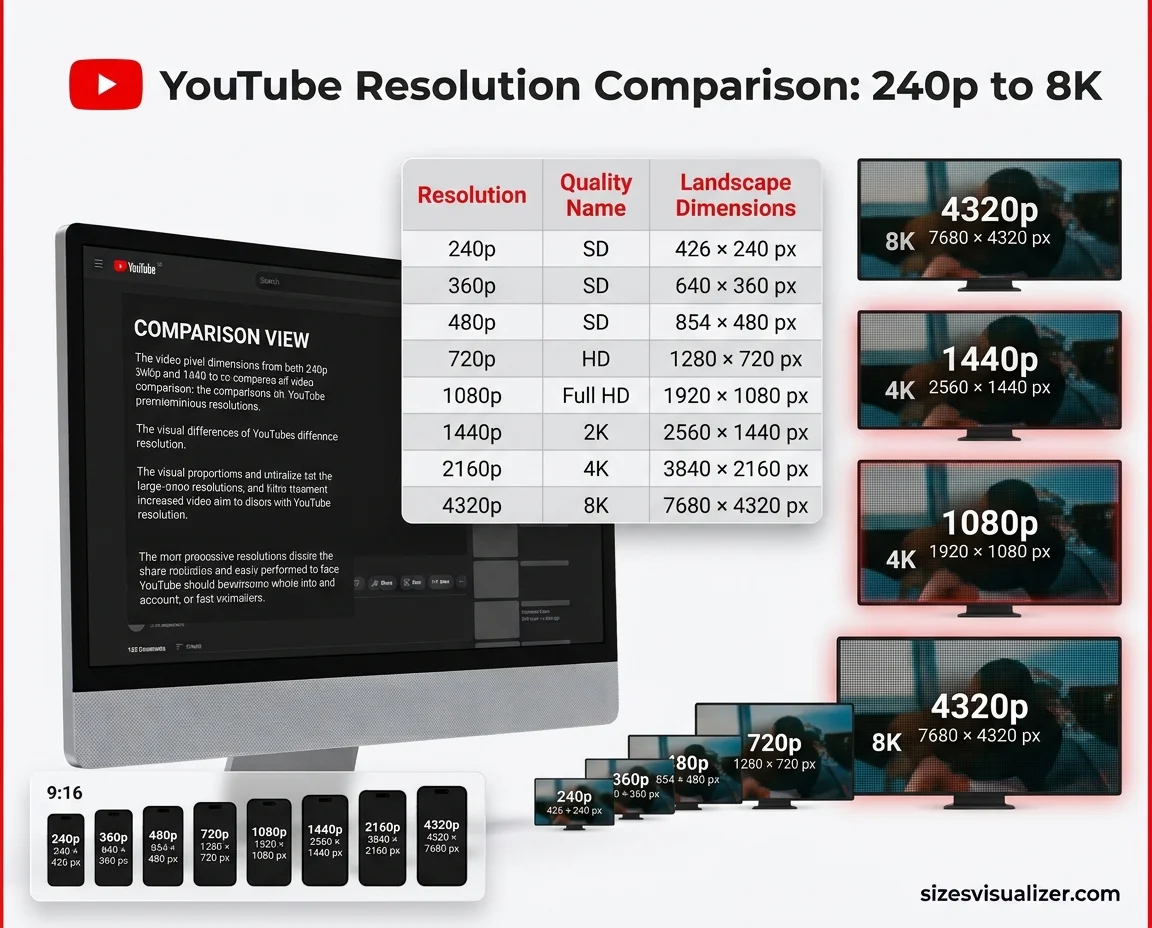
What are the standard YouTube video resolutions? YouTube Help lists these sizes for the default 16:9 ratio. The last column shows how many pixels sit in each frame.
| Resolution | Common name | 16:9 size (px) | 9:16 size (px) | Pixels per frame |
|---|---|---|---|---|
| 240p | SD | 426×240 | 240×426 | 0.10 million |
| 360p | SD | 640×360 | 360×640 | 0.23 million |
| 480p | SD | 854×480 | 480×854 | 0.41 million |
| 720p | HD | 1280×720 | 720×1280 | 0.92 million |
| 1080p | Full HD | 1920×1080 | 1080×1920 | 2.07 million |
| 1440p | 2K | 2560×1440 | 1440×2560 | 3.69 million |
| 2160p | 4K | 3840×2160 | 2160×3840 | 8.29 million |
| 4320p | 8K | 7680×4320 | 4320×7680 | 33.18 million |
What is the difference between aspect ratio, resolution, and dimensions? Think of it like a picture frame:
- Aspect ratio is the shape, such as 16:9 or 9:16.
- Dimensions are the width and height in pixels, such as 1920×1080.
- Resolution is the quality tier, such as 1080p or 4K.
A 720p clip and a 4K clip share the same 16:9 shape. The 4K one simply holds four times the pixels of 1080p.
How do you check if a size is 16:9? Divide the width by 16 and the height by 9. If both answers match, it is 16:9. For 1920×1080, both come to 120.
Two more facts help you plan:
- In-between sizes are gone. YouTube started removing playback for sizes between 4K and 8K in 2022, so a 5K export adds nothing over 4K.
- Upload the highest quality you have. YouTube builds the lower versions for slow connections on its own. Larger uploads may also take longer to process, so a 4K video can appear softer for a while after publishing.
YouTube Aspect Ratios: Video Size for Shorts, Thumbnails & Banners
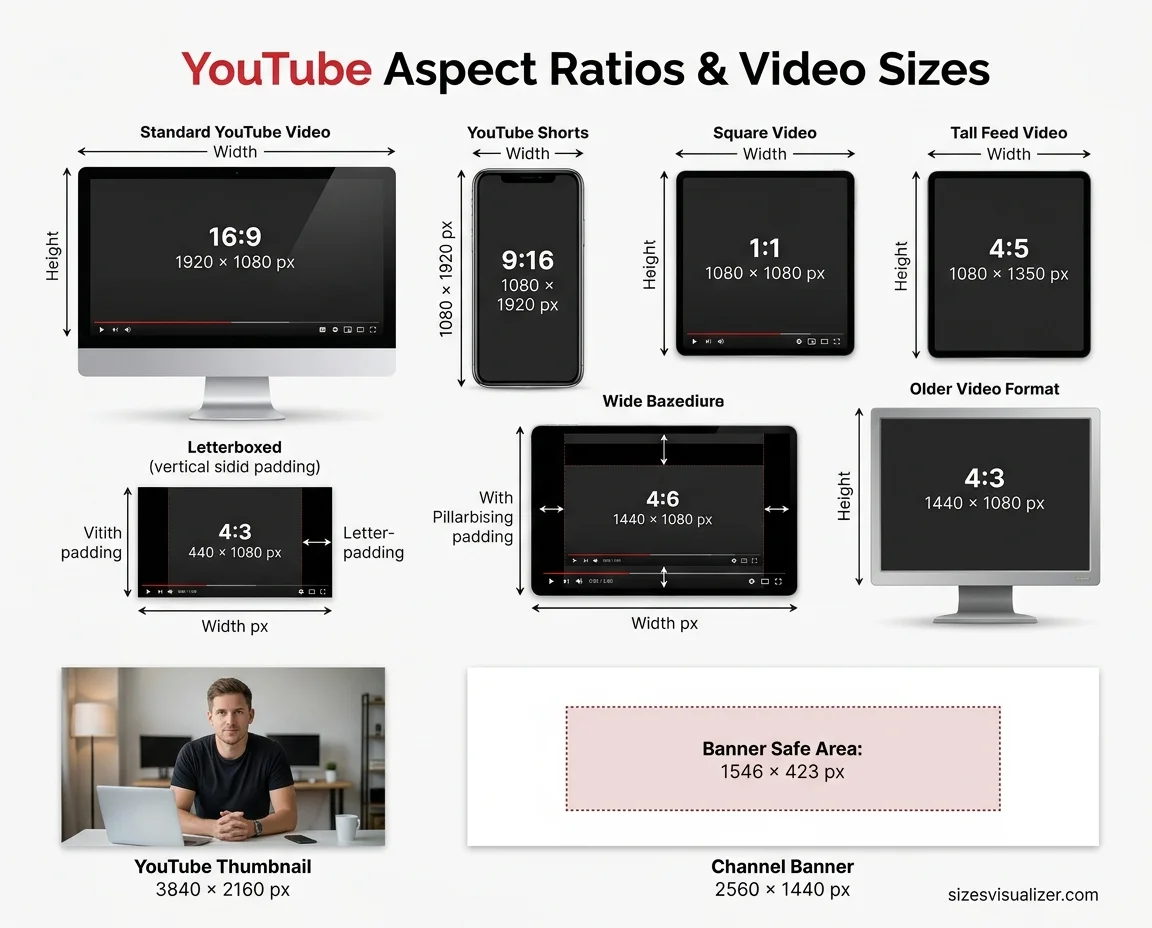
Which aspect ratios does YouTube support? The player adapts to almost any shape. Only the fit changes.
| Aspect ratio | Best use | What viewers see on desktop |
|---|---|---|
| 16:9 | Standard videos | Full frame, no padding |
| 9:16 | Shorts, mobile-first clips | Padding on both sides |
| 1:1 | Square clips | Padding on both sides |
| 4:5 | Tall feed-style clips (1080×1350) | Padding on both sides |
| 4:3 | Older footage, retro look | Padding on both sides |
What are pillarboxing and letterboxing? Pillarboxing adds bars on the left and right. Letterboxing adds bars on the top and bottom. YouTube says the padding is white by default and dark gray in Dark theme. It also asks creators not to add padding or black bars to the video itself, because that blocks the player from adjusting to the viewer’s screen.
What size is a YouTube Short? Use 1080×1920 (9:16). Since October 15, 2024, any square or vertical upload up to three minutes long counts as a Short. A 16:9 video stays a regular video, even if it is only 30 seconds long. On a Short, the title, caption, and buttons sit over the bottom and right edges. Keep key text and faces in the center.
What size should a YouTube thumbnail be? YouTube now recommends 3840×2160 (16:9) for video thumbnails, with a 640 px minimum width. The older 1280×720 size still works.
- File size: up to 50 MB from a computer, 2 MB from the mobile app.
- Format: JPG or PNG is the safest choice.
- Shorts thumbnails: 2160×3840, with a 640 px minimum height.
- Keep the bottom-right corner clear. The video length badge sits there.
What size is a YouTube channel banner? Upload 2560×1440, with a minimum of 2048×1152 and a limit of 6 MB. Only the centered safe area shows on every device. It measures about 1546×423 px on a 2560×1440 canvas. TVs show the full image, while desktops show a wide strip about 423 px tall. Place your name, logo, and tagline in the center.
What size is a YouTube profile picture? Use 800×800. YouTube shows it as a circle at 98×98 px on channel pages, and smaller beside comments. Choose a simple logo or a clear face.
Just as choosing the right YouTube video dimensions ensures a better viewing experience, selecting an apartment with the right layout makes everyday living more comfortable. If you’re exploring spacious living options, discover this complete guide to Dimensions Living Appleton apartments, including floor plans, apartment sizes, and modern amenities.
Best YouTube Video Size Export Settings: Format, Bitrate & File Size
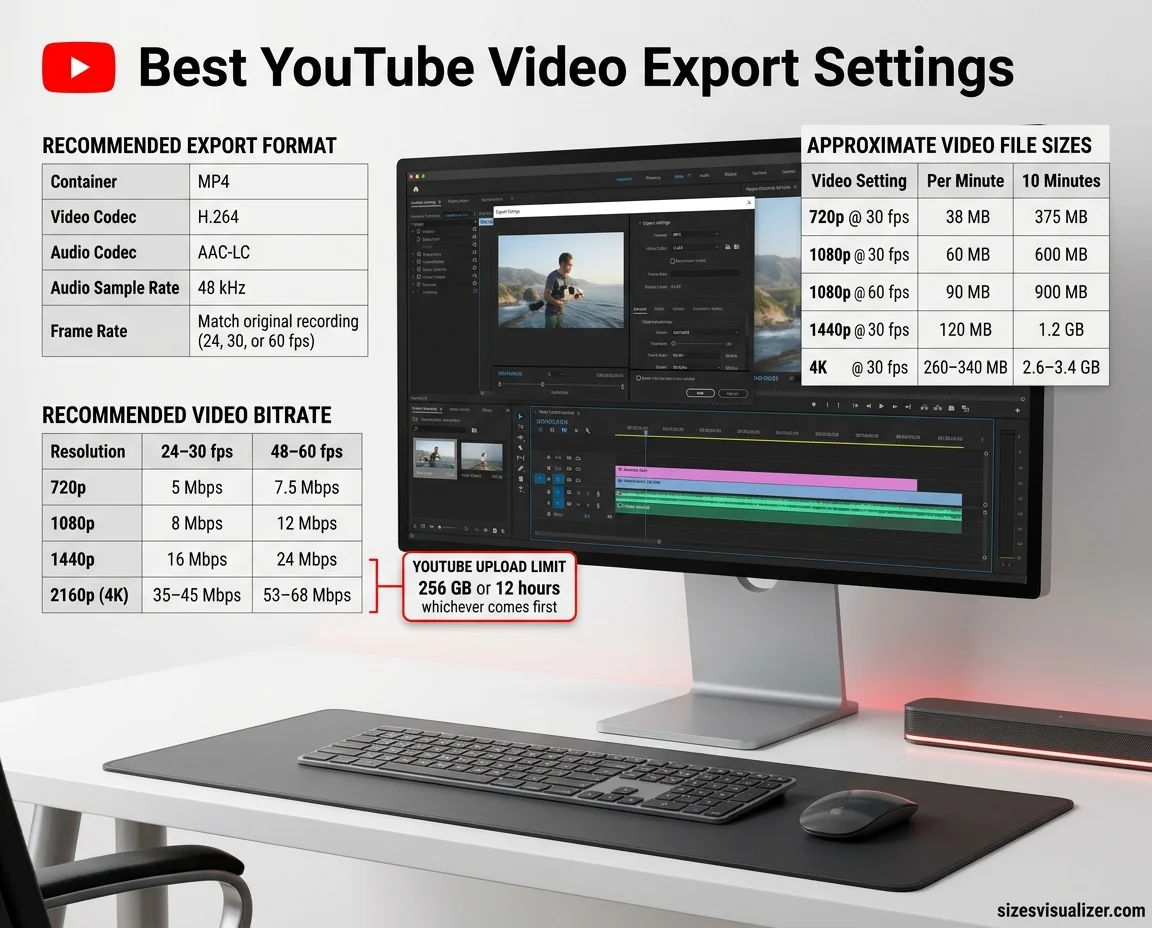
What is the best format for YouTube? YouTube recommends an MP4 container, H.264 video, and AAC-LC audio at 48 kHz. Export at the frame rate you recorded, such as 24, 30, or 60 fps. Converting between rates adds stutter, not quality.
What bitrate does YouTube recommend? These are YouTube’s targets for standard (SDR) uploads. For stereo audio, aim for 384 kbps.
| Resolution | 24, 25, or 30 fps | 48, 50, or 60 fps |
|---|---|---|
| 720p | 5 Mbps | 7.5 Mbps |
| 1080p | 8 Mbps | 12 Mbps |
| 1440p | 16 Mbps | 24 Mbps |
| 2160p (4K) | 35–45 Mbps | 53–68 Mbps |
How big is a YouTube video file? Use this quick formula: bitrate ÷ 8 = megabytes per second. At 8 Mbps, that is 1 MB per second, or 60 MB per minute. Audio adds about 3 MB per minute.
| Setting | Approx. video size per minute | Approx. size for 10 minutes |
|---|---|---|
| 720p at 30 fps | 38 MB | 375 MB |
| 1080p at 30 fps | 60 MB | 600 MB |
| 1080p at 60 fps | 90 MB | 900 MB |
| 1440p at 30 fps | 120 MB | 1.2 GB |
| 4K at 30 fps | 260–340 MB | 2.6–3.4 GB |
What are the YouTube upload limits? A file can reach 256 GB or 12 hours, whichever comes first. Unverified accounts can upload videos up to 15 minutes long.
Four habits protect quality:
- Set the canvas first. Choose 1920×1080 or 1080×1920 before you edit, not at export.
- Record in the final shape. Cropping a wide clip into 9:16 often cuts off faces and slides.
- Skip burned-in bars. Let the player handle padding.
- Preview on three screens. Check the finished video on a phone, a laptop, and a TV.
FAQs
Is a YouTube video 1920×1080?
Often, yes. 1920×1080 (1080p) is the most common and recommended size for standard videos. But YouTube supports sizes from 426×240 up to 7680×4320. Shorts use 1080×1920 instead.
Is YouTube 16×9 or 4×3?
YouTube uses 16:9 as its standard on computers. A 4:3 video still plays, but the player adds padding on the sides. Export in the real shape of your video and skip burned-in bars.
How large is a 1920×1080 video?
In pixels, a 1920×1080 frame holds 2,073,600 pixels. As a file, a 10-minute video at YouTube’s 8 Mbps target for 30 fps is about 600 MB. At 60 fps and 12 Mbps, it is about 900 MB.
Is 1920×1080 a 16:9 ratio?
Yes. Divide both numbers by 120 and you get 16 and 9. That makes 1920×1080 a true 16:9 size.
Is 1280×720 a 16:9 resolution?
Yes. Divide both numbers by 80 and you get 16 and 9. It is known as 720p HD, and it is also the older standard thumbnail size.
Is 1080×1350 a 4×5 ratio?
Yes. Divide both numbers by 270 and you get 4 and 5. A 4:5 frame is taller than it is wide, so YouTube treats it as vertical. For a full-screen Shorts look, 1080×1920 (9:16) fits better.
Conclusion
Use 1920×1080 for standard videos, 1080×1920 for Shorts, and 3840×2160 for thumbnails. Export in MP4 at the recommended bitrate. Save these as presets, and every upload starts in the right shape.

Measurement Researcher, Size Comparison Writer & Content Specialist
Timmy Ahad is a dedicated content writer and research specialist at SizesVisualizer.com, where he focuses on creating accurate, easy-to-understand content about measurements, dimensions, size comparisons, and real-world object visualization.