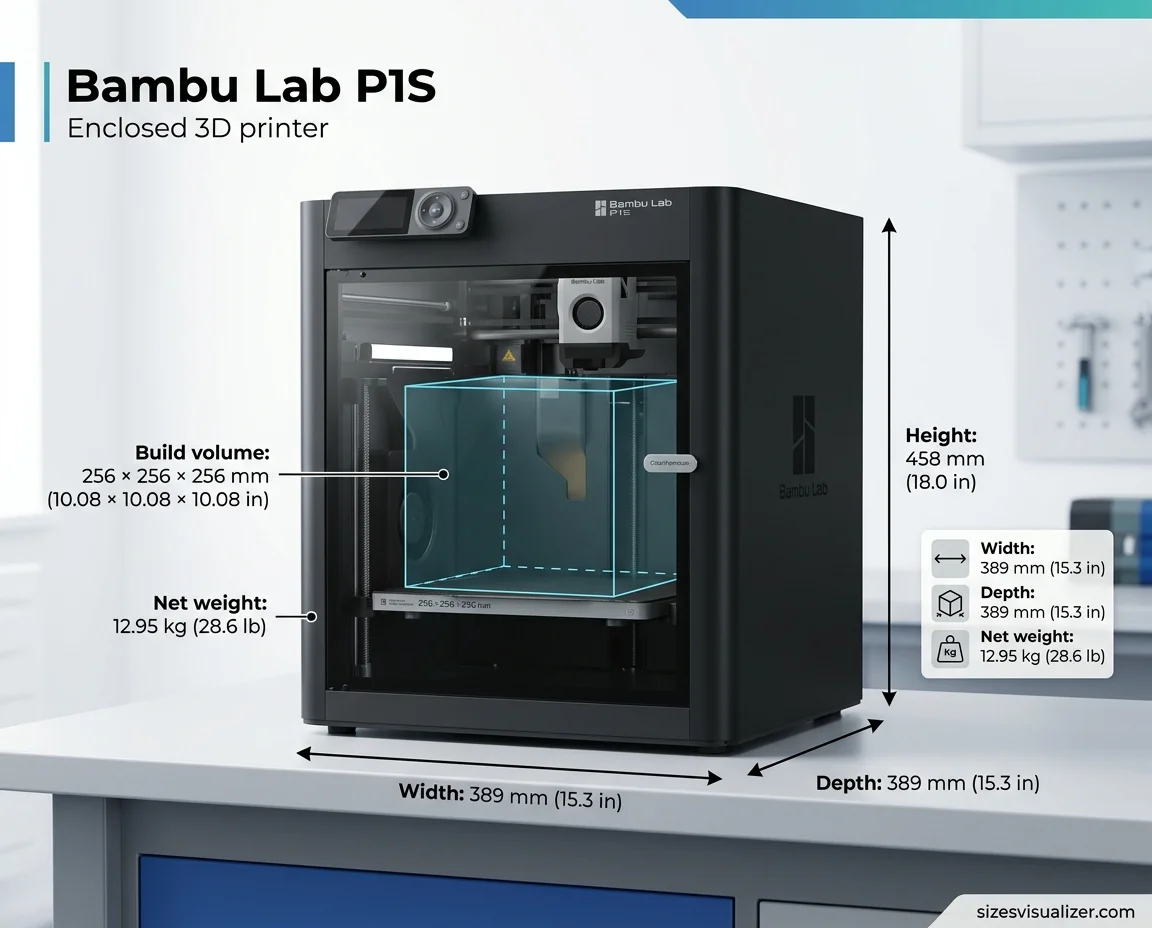
The Bambu Lab P1S dimensions are 389 x 389 x 458 mm (15.3 x 15.3 x 18.0 in), and the printer weighs 12.95 kg (28.6 lb) net, per Bambu Lab’s P1S page. The print area is 256 x 256 x 256 mm (10.08 in).
Add an AMS and you need more room for the unit and its spools. This guide gives the exact numbers in inches and mm, so you can check your desk before you buy.
| Measurement | Metric | US units |
|---|---|---|
| P1S size (W x D x H) | 389 x 389 x 458 mm | 15.3 x 15.3 x 18.0 in |
| P1S net weight | 12.95 kg | 28.6 lb |
| Print area (build volume) | 256 x 256 x 256 mm | 10.08 x 10.08 x 10.08 in |
| AMS 2 Pro size | 372 x 280 x 226 mm | 14.7 x 11.0 x 8.9 in |
Table of Contents
Bambu Lab P1S Dimensions and Size (Without AMS)
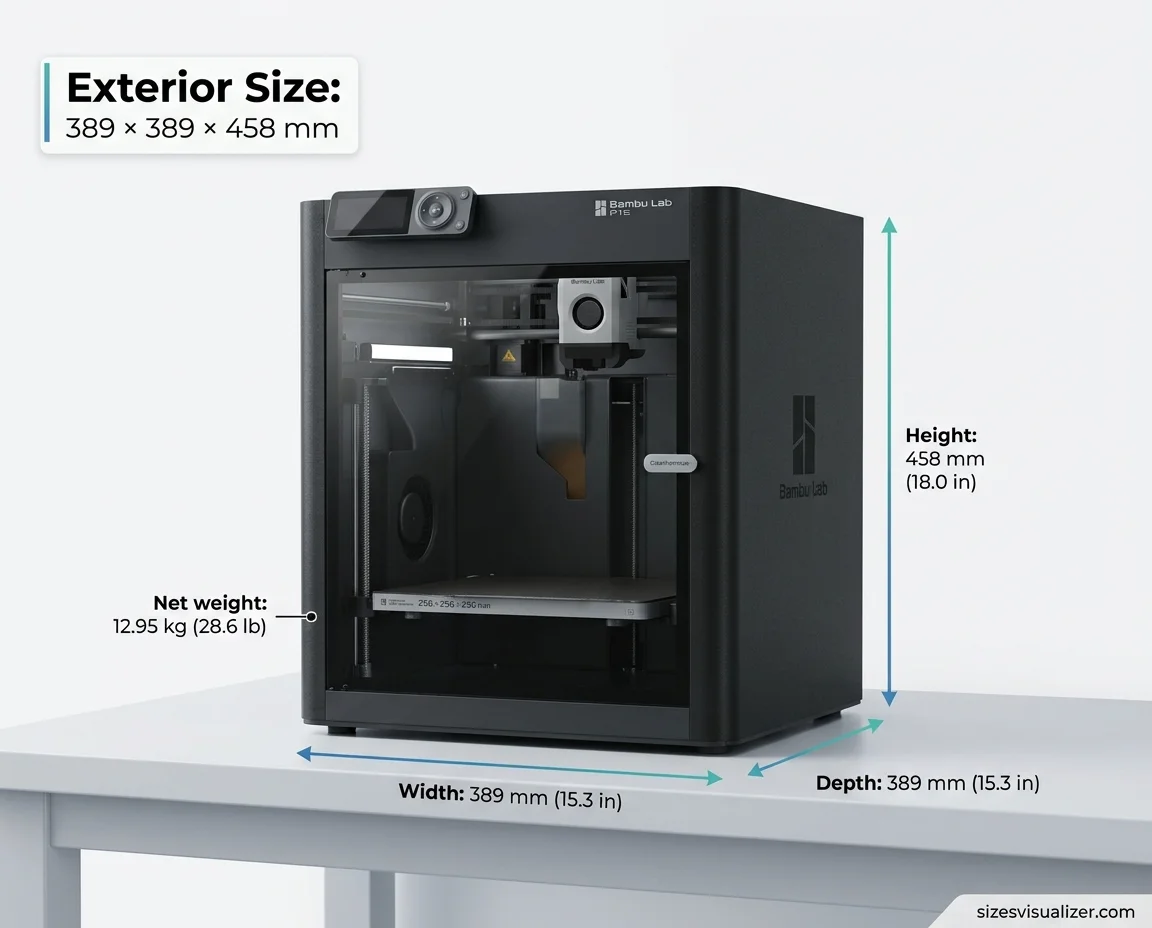
The Bambu P1S size is the same on every side: 389 mm wide and deep. It stands 458 mm tall. That is a full-size enclosed 3D printer, and it needs a solid surface.
The weight matters as much as the footprint. At 12.95 kg net, the P1S is heavy for a desktop printer. The shipping weight is 17.60 kg (38.8 lb) and the box measures 485 x 480 x 530 mm. Check that your shelf can hold the load.
Printer size and print area are different numbers. The 389 mm figure is the outside of the machine. The 256 mm figure is the room for your part.
Bambu Studio also sets the default printable height to 250 mm (9.84 in). The last 6 mm needs a manual change, and Bambu explains the safety steps on its store page.
Bambu Lab P1S Size With AMS (Footprint and Desk Space)
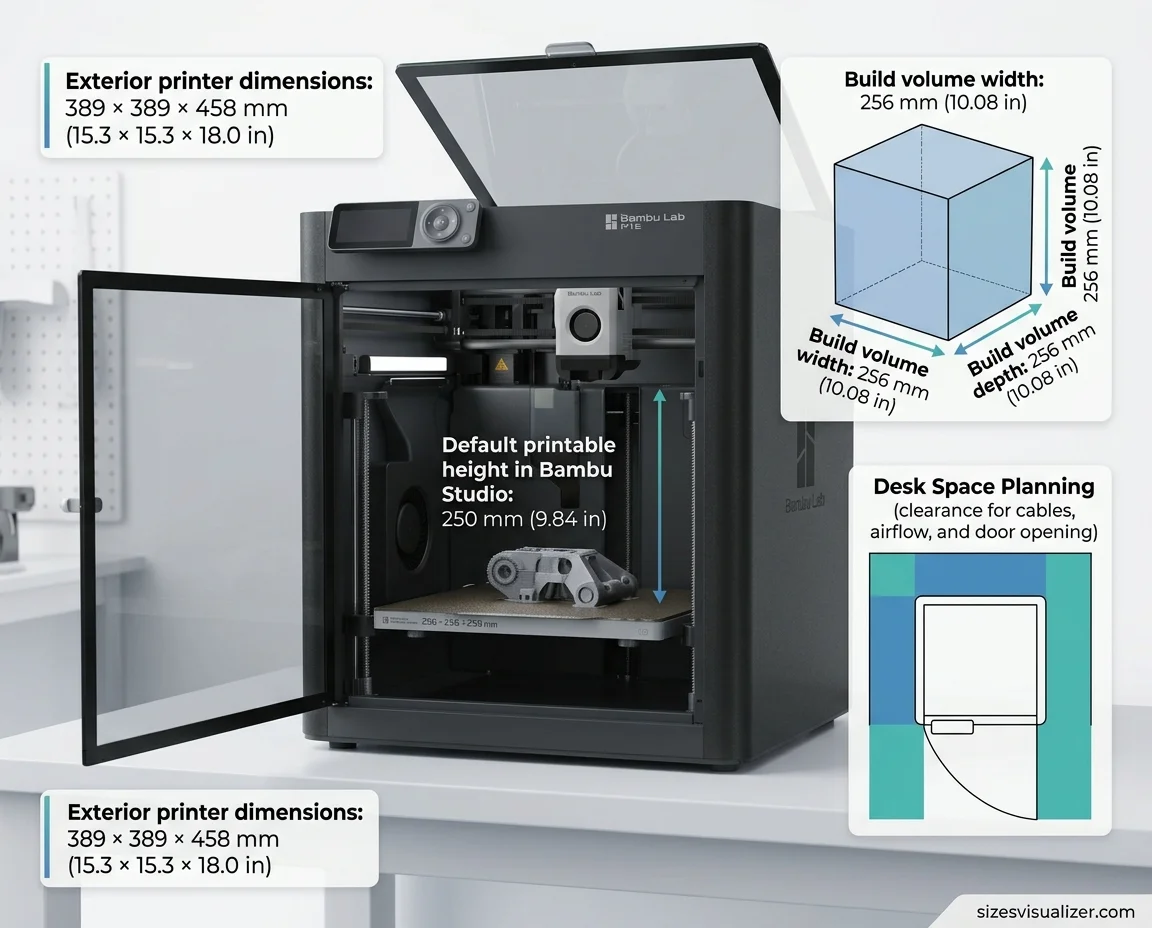
The P1S with AMS needs more room than the printer alone. The combo box measures 485 x 480 x 585 mm. The gross weight, with the AMS included, is 21.60 kg (47.6 lb).
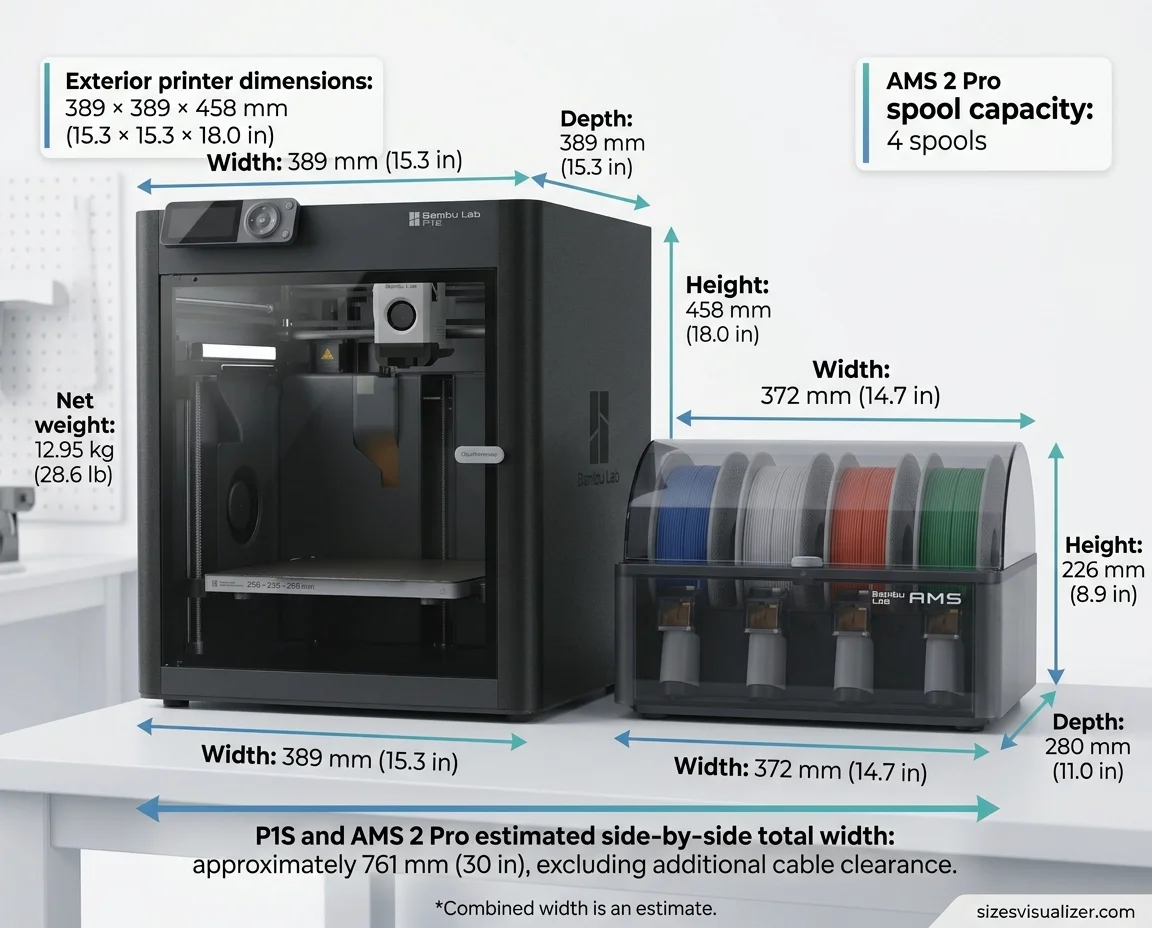
The newer AMS 2 Pro measures 372 x 280 x 226 mm, according to a US retailer listing. Bambu Lab now sells the P1S in an AMS 2 Pro combo, and the combo comes in separate boxes.
Here is simple math for planning. These are estimates, not Bambu numbers.
- Side by side: about 761 mm (30 in) of total width, plus cable room.
- Stacked on top: about 684 mm (26.9 in) of total height. That leaves little overhead clearance, and it blocks easy access to the top.
One AMS holds four spools. It fits spools 50 to 68 mm wide and 197 to 202 mm across. Together, AMS units can feed up to 16 colors. The combo with an AMS Hub links up to four units.
Bambu Lab P1S Full Specifications
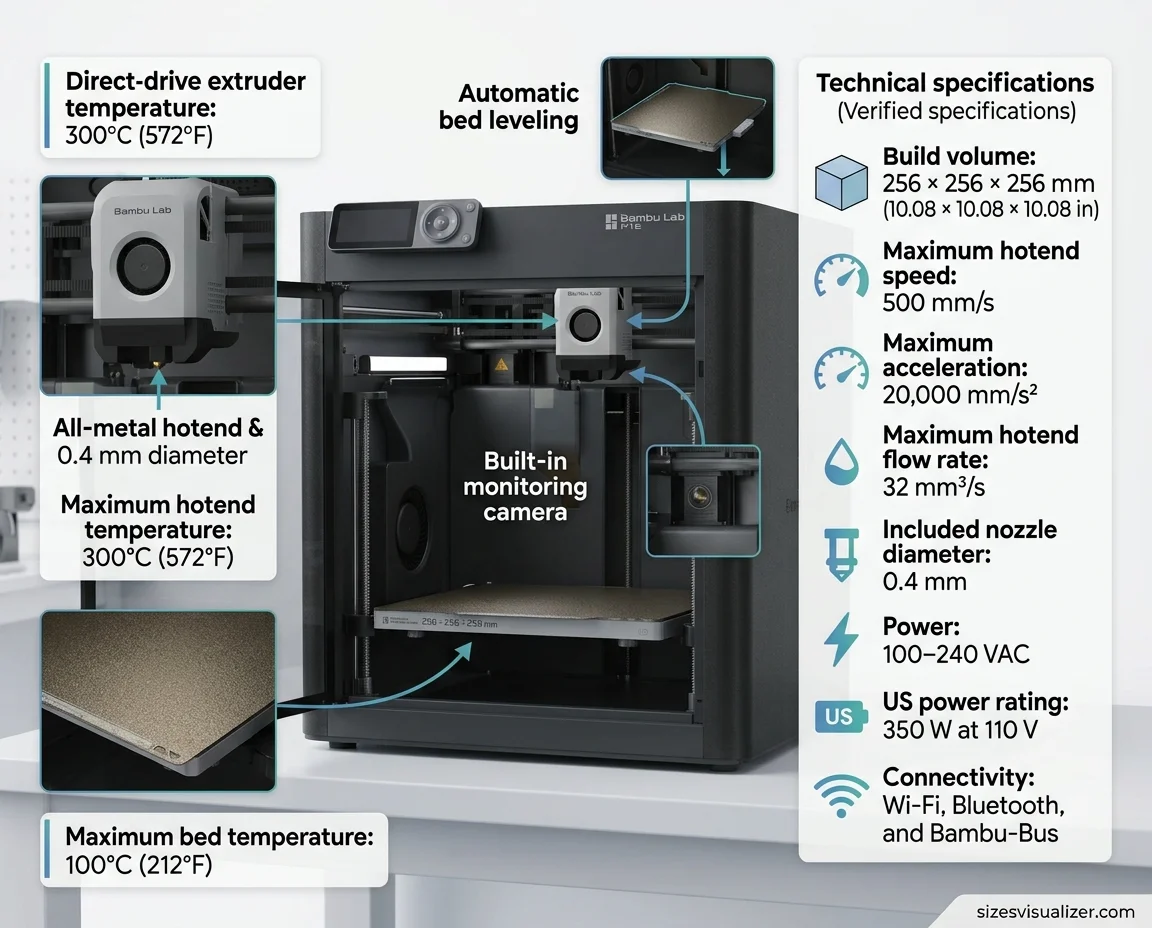
Here are the core P1S specs from Bambu Lab’s wiki:
- Build volume: 256 x 256 x 256 mm.
- Max hotend temperature: 300 °C (572 °F).
- Max bed temperature: 100 °C (212 °F).
- Max tool head speed: 500 mm/s.
- Max acceleration: 20 m/s² (20,000 mm/s²).
- Max hotend flow: 32 mm³/s, measured with ABS at 280 °C.
- Nozzle: 0.4 mm stainless steel included. The 0.2, 0.6 and 0.8 mm sizes are optional.
- Chamber fan: closed-loop control.
- Power: 100 to 240 VAC, 350 W at 110 V (US).
- Connectivity: Wi-Fi, Bluetooth and Bambu-Bus.
- Slicer: Bambu Studio. It also accepts G-code from third-party slicers.
The P1S has an all-metal hotend, a direct drive extruder, automatic bed leveling and a built-in camera for timelapse. It supports PLA, PETG, TPU, ABS, ASA and PVA. It ships with a textured PEI plate.
The enclosure has no chamber heater. It holds in heat from the bed.
While the Bambu Lab P1S offers impressive 3D printing capabilities in a compact footprint, planning your workspace efficiently is essential for balancing equipment and available room. If you’re looking for another space-saving solution, explore these Murphy bed dimensions and size options to find the right fit for your room and maximize floor space.
Bambu Lab P1S Print Area and Space Planning Tips
The P1S print area is a 256 mm cube. It handles brackets, organizers, enclosures and most tabletop parts. Large helmets and long panels need to be split.
Brims, supports and purge lines use bed space. Slice the real file before you decide that a part fits.
Multi-color jobs need extra room. The AMS purges filament at each color change, so the purge tower takes space on the plate. Rotating a long part diagonally can also help it fit.
Setup tips for your desk:
- Leave a gap behind the printer for the filament path and cables.
- Keep the front free so the door can open.
- Use a level, stable surface that can take the weight.
- Keep the printer away from drafts.
- Leave air space around the vents.
FAQs
Is a Bambu P1S worth it?
It suits buyers who want an enclosed printer and multi-color printing with the AMS. It has a 256 mm cube, 20,000 mm/s² acceleration and ABS and ASA support. It has no chamber heater. One news digest lists the price near $399, so check the current price.
How big is Bambu Lab P1S print area?
The P1S print area is 256 x 256 x 256 mm, or about 10.08 inches on each axis. Bambu Studio sets the default height to 250 mm. You can unlock the last 6 mm by following Bambu’s safety steps.
What are the dimensions of the Bambu Lab P1S?
The P1S measures 389 x 389 x 458 mm (15.3 x 15.3 x 18.0 in) and weighs 12.95 kg (28.6 lb). The AMS 2 Pro adds a unit of 372 x 280 x 226 mm (14.7 x 11.0 x 8.9 in).
Is Bambu A1 or P1S faster?
Both list a top tool head speed of 500 mm/s. The P1S has higher acceleration, at 20,000 mm/s² against 10,000 mm/s². Its flow rate is also higher, at 32 mm³/s against 28 mm³/s. Real-world gaps are small, according to this side-by-side comparison.
Is Bambu P1S end of life?
No. Bambu Lab ended the P1P on February 10, 2026. Its farewell post says the P1S will keep being made and sold, with no plans to phase it out in the foreseeable future. Check Bambu’s site for current status.
Is the Bambu P1S noisy?
It is louder than the A1. One spec database lists about 55 dB for the P1S and 49 dB for the A1. The fans and fast motion add to the sound. A stable surface and lower speed modes help.
Conclusion
The Bambu Lab P1S dimensions are 389 x 389 x 458 mm, with a 256 mm cube of print area. An AMS adds roughly another 14.7 in of width or 8.9 in of height. Measure your space first, then pick the single printer or the P1S combo.

Measurement Researcher, Size Comparison Writer & Content Specialist
Timmy Ahad is a dedicated content writer and research specialist at SizesVisualizer.com, where he focuses on creating accurate, easy-to-understand content about measurements, dimensions, size comparisons, and real-world object visualization.