Buying a 55 inch TV without checking the exact measurements is a common mistake. The screen might fit the wall but not the stand. Or the viewing distance might be off, making the picture blurry or overwhelming.
This guide breaks down everything you need: 55 inchs TV width and height, depth by panel type, ideal viewing distance, wall mount specs, and room size requirements. Every number here is based on standard TV geometry, not guesswork.
What Does “55-Inch TV” Actually Mean?
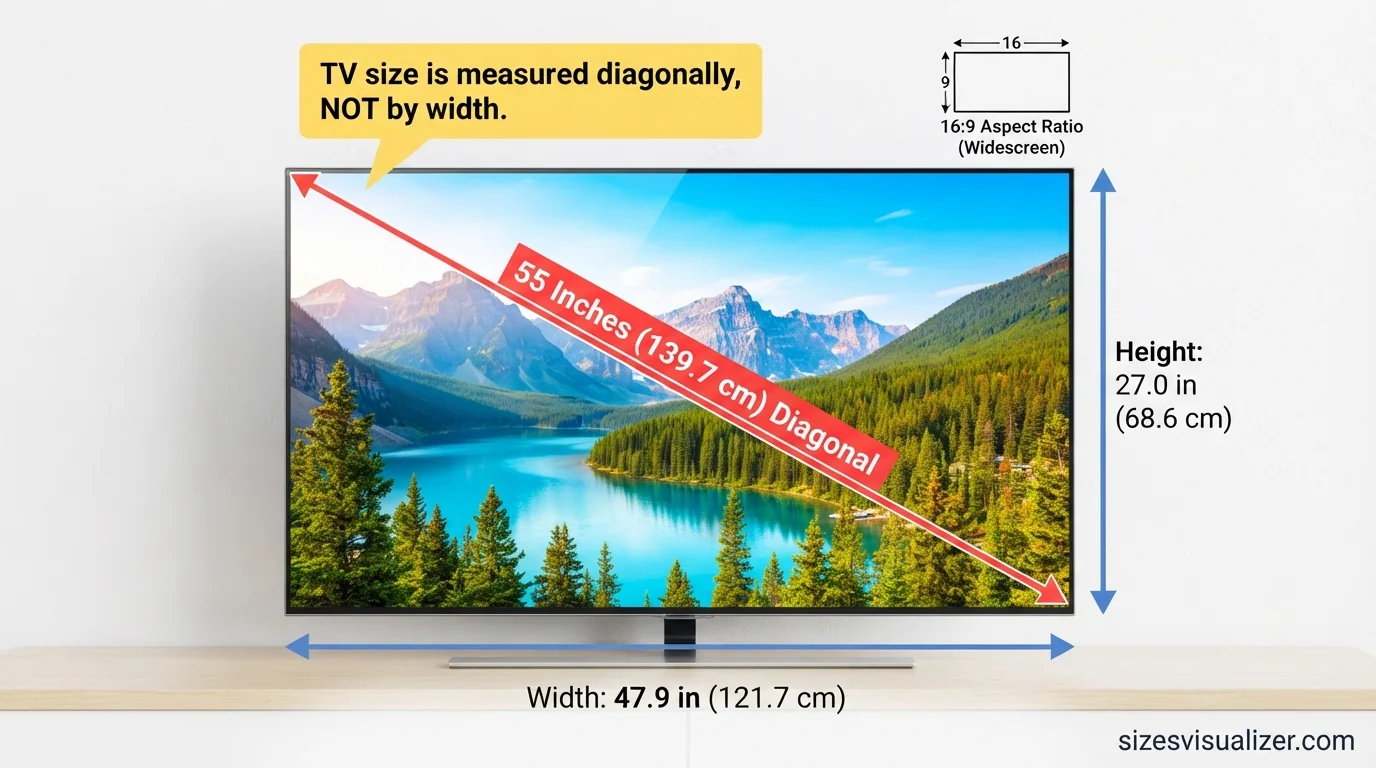
The “55” refers to the diagonal screen measurement, taken from one corner to the opposite corner. It’s not the width. It’s not the height. It’s a straight line across the glass.
Manufacturers use diagonal measurement because it gives one consistent number, no matter the shape of the screen. This makes comparing TVs across brands easier.
Almost every modern TV uses a 16:9 aspect ratio. That means the screen is 16 units wide for every 9 units tall. Using the Pythagorean theorem (a² + b² = c²), you can calculate exact width and height from the diagonal:
- 55² = a² + b²
- Width ≈ 47.9 inches
- Height ≈ 27 inches
One detail people miss: this calculation covers the screen only, not the outer frame. The bezel — the plastic or metal edge around the panel — adds extra width and height to the physical unit. Bezels on 2026 TVs are thinner than older models, usually adding just 0.2 to 0.6 inches per side, but it still matters for tight spaces.
Key takeaway: the 55-inch label describes the glass, not the whole product. Always check listed physical dimensions before buying furniture.
55 Inch TV Dimensions: Width, Height & Depth

Here are the standard 55 inch TV dimensions in inches, centimeters, and feet:
| Measurement | Inches | Centimeters | Feet |
|---|---|---|---|
| Diagonal | 55.0″ | 139.7 cm | 4.58 ft |
| Width | 47.9″ | 121.7 cm | 3.99 ft |
| Height | 27.0″ | 68.6 cm | 2.25 ft |
These numbers apply to the screen only. Once you add the bezel, the full unit typically measures 48 to 49 inches wide.
Depth varies a lot by panel technology. This is where most buying guides fall short — depth affects wall clearance and shelf fit just as much as width does.
- OLED panels: 0.4 to 1.8 inches thick (the thinnest option on the market)
- Standard LED/QLED: 2 to 3.5 inches thick
- Mini LED: typically 2.5 to 3 inches, slightly thicker due to the backlight array
With the factory stand attached, total height increases. Most 55-inch models stand between 28 and 31 inches tall with legs on, and stand depth (front to back) can run 9 to 13 inches, depending on the brand’s foot design.
Why this matters: a shelf that’s too shallow leaves the TV’s back edge hanging off the surface. That’s a stability risk, especially in households with kids or pets.
55 Inch TV Viewing Distance: How Far Should You Sit?
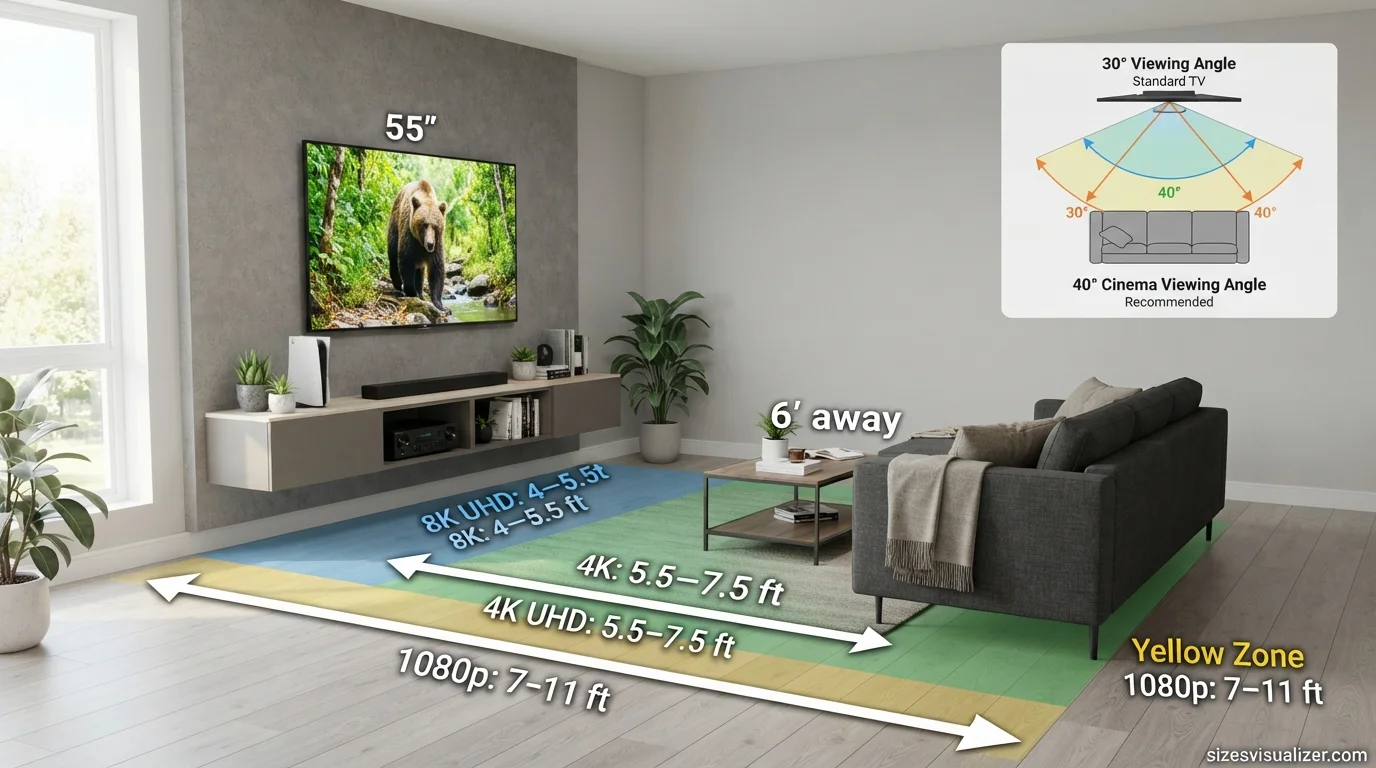
Viewing distance is the space between your eyes and the screen. Get it wrong, and you’ll either strain your eyes or lose the sense of immersion the screen is meant to give.
The Society of Motion Picture and Television Engineers (SMPTE) set two reference angles that most viewing charts are built around:
- 30° angle (general viewing): comfortable for everyday TV, sports, and casual watching
- 40° angle (cinema-style): closer seating for a movie-theater feel, recommended for dedicated home theater setups
For a 55 inch TV viewing distance, here’s the breakdown by resolution:
| Resolution | Optimal Distance |
|---|---|
| Full HD (1080p) | 7.0 – 11.0 ft |
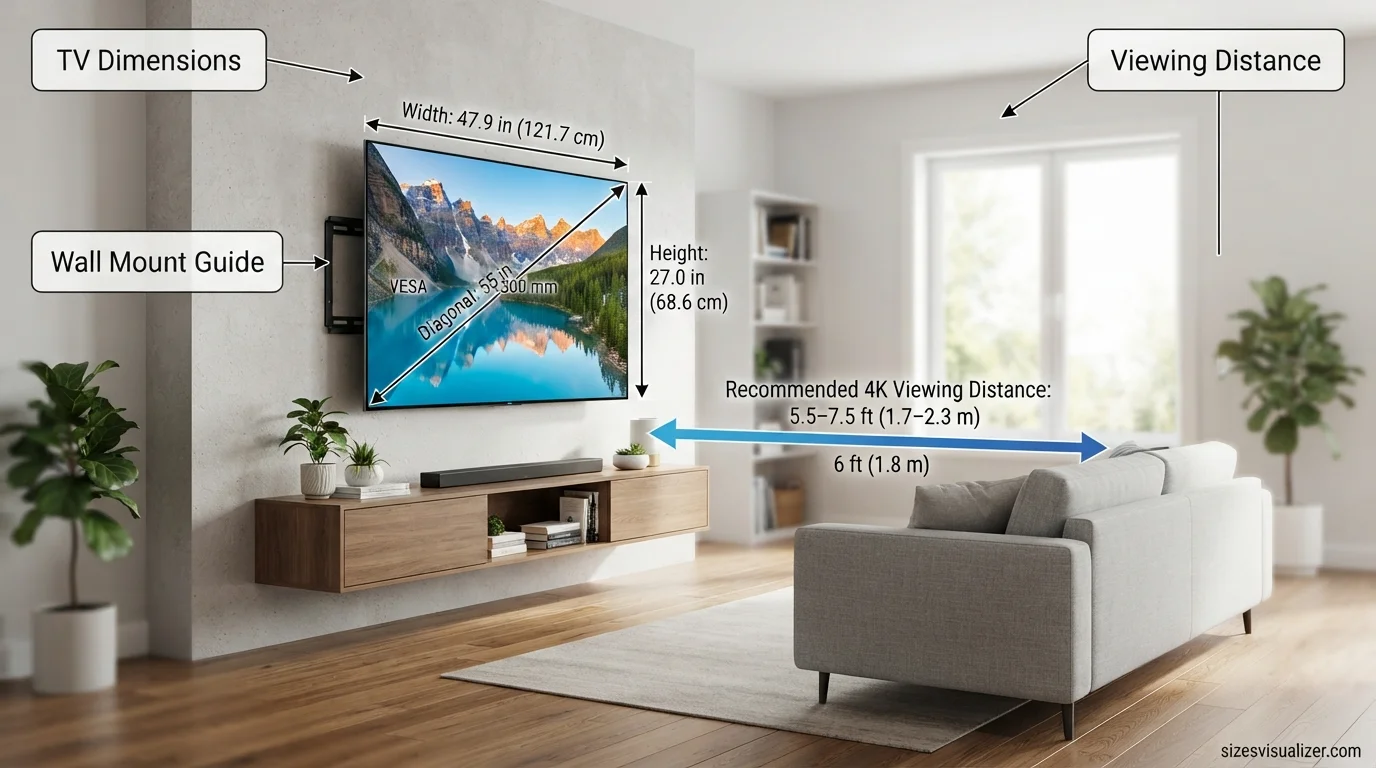
| 4K UHD | 5.5 – 7.5 ft |
| 8K UHD | 4.0 – 5.5 ft |
Why does resolution change the math? Higher pixel density means less visible pixel structure at close range. A 4K panel packs four times the pixels of 1080p into the same screen size, so you can sit closer without seeing individual dots.
A quick formula also works: multiply the diagonal size by 1.2 to get the ideal distance in inches. For a 55-inch screen: 55 × 1.2 = 66 inches, or 5.5 feet — which lines up closely with the 4K range above.
Bottom line: if you’re watching 4K content (which most streaming platforms default to now), aim for roughly 6 feet between your sofa and the screen.
Must Visit: How Big Is a 65 Inch TV? Exact Dimensions, Width, Height & Viewing Distance Guide
Wall Mounting a 55 Inch TV: VESA Pattern, Height & Space
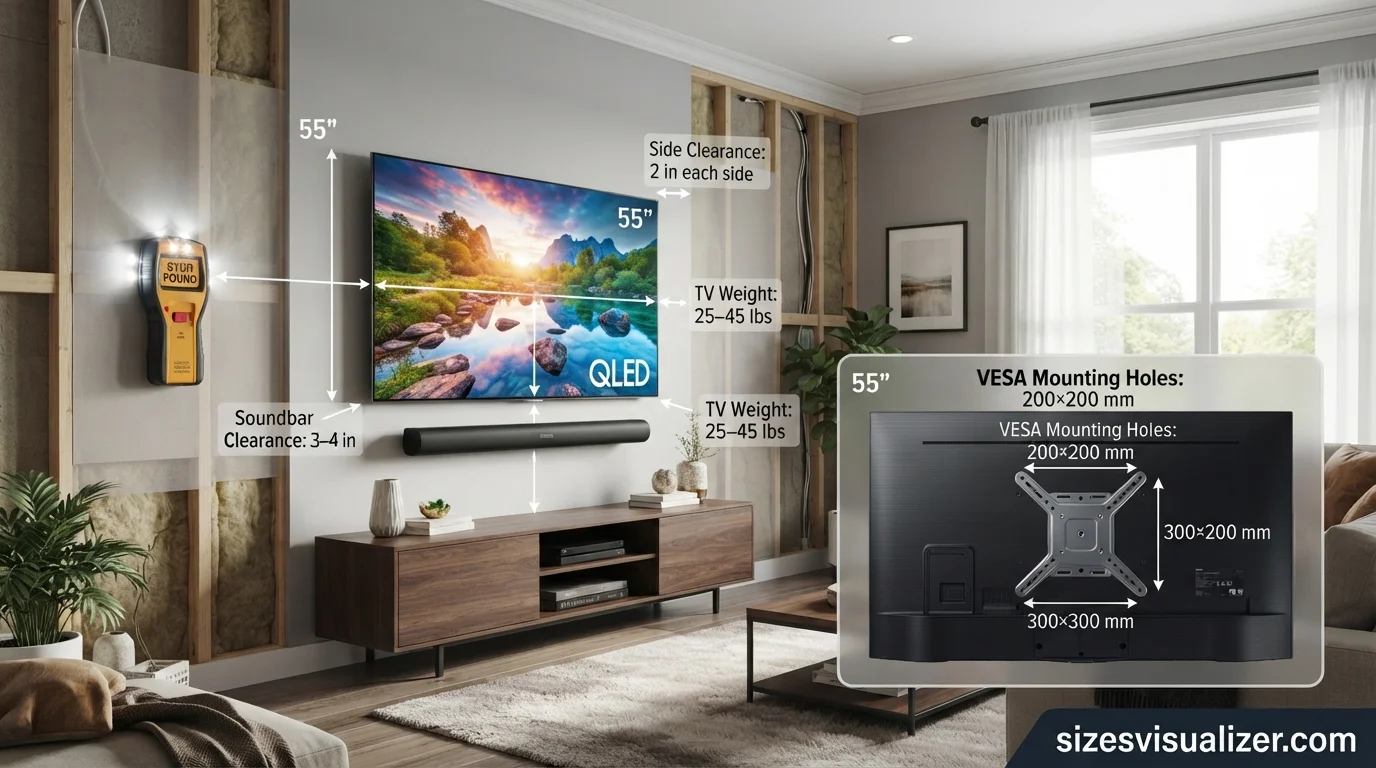
Wall mounting a 55 inch TV solves floor space problems, but only if the mount matches the TV’s specs.
Check the VESA pattern first. VESA is a standardized set of hole spacing measurements on the back of the TV, used to attach a bracket. Most 55-inch TVs use one of these patterns:
- 200×200 mm
- 300×200 mm
- 300×300 mm
The 400×300 mm pattern shows up more often on 65-inch and larger screens, so double-check your exact model before buying a bracket — an incompatible mount can’t be adjusted after the fact.
Mounting height matters just as much as the bracket. The general target is placing the center of the screen at eye level when seated, which for most sofas lands around 42 inches from the floor. This isn’t a rigid rule — it shifts based on ceiling height, sofa height, and personal comfort — but it’s a reliable starting point.
Space and weight checklist:
- Leave at least 2 inches of clearance on each side for airflow and cable routing
- Confirm your wall mount’s weight rating exceeds the TV’s weight (most 55-inch models weigh 25 to 45 pounds without the stand)
- If adding a soundbar underneath, budget an extra 3 to 4 inches of clearance below the screen
- Route cables through wall channels or a cord cover for a cleaner finish
A stud finder is non-negotiable. Mounting into drywall alone, without hitting a stud, is one of the most common causes of TV wall-mount failure.
55 Inch TV Room Size & TV Stand Requirements
Room size affects comfort more than most buyers expect. A screen that looks perfect in a showroom can feel oversized in a small apartment bedroom.

Minimum room size for a 55-inch TV is generally around 190 square feet (roughly 18 square meters), with 270 square feet considered ideal for comfortable viewing at a proper distance. Smaller rooms aren’t off-limits, but they do call for shorter viewing distances closer to the 4K minimum of 5.5 feet.
For the TV stand, width matters more than most people realize. A stand that’s too narrow creates two problems:
- Tip risk: wide-set TV legs sitting near the edge of the stand can shift the center of gravity during a bump
- Visual imbalance: a screen wider than its base looks top-heavy
The safest match for most 55-inch TVs is a 60-inch stand, which leaves 5 to 6 inches of clearance on each side. This also gives room for a soundbar or speakers without crowding the base.
Stand depth should be at least 15 inches for most models, since some factory legs need up to 13 inches of front-to-back clearance. Anything shallower risks the base hanging off the rear edge.
Visualize the exact dimensions of a 55-inch TV with our interactive Size Visualizer tool and see how it fits in your room before making a purchase.
55 Inch TV vs Other Sizes: Is It Right for You?
Context helps more than raw numbers. Here’s how a 55 inch TV stacks up against neighboring sizes:
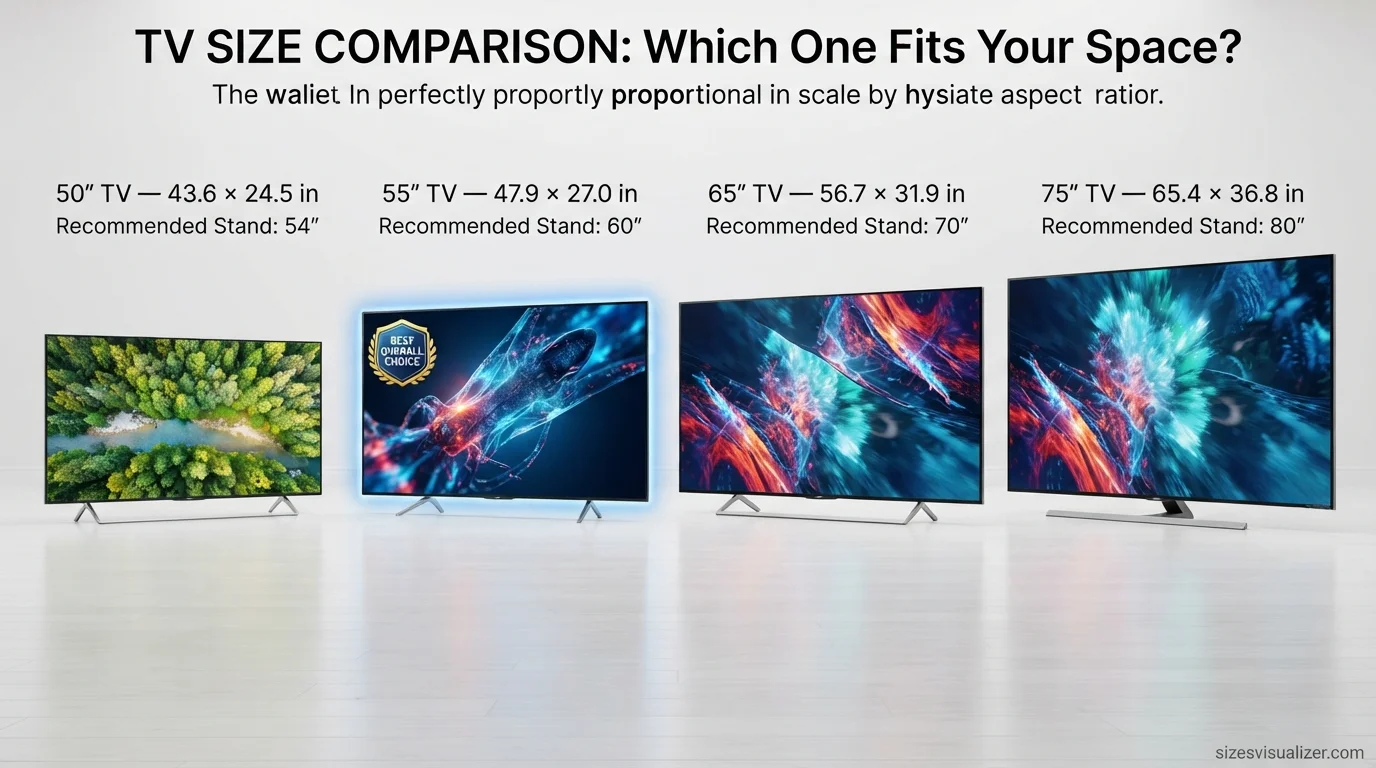
| Size | Width | Height | Recommended Stand |
|---|---|---|---|
| 50″ | 43.6″ | 24.5″ | 54″ |
| 55″ | 47.9″ | 27.0″ | 60″ |
| 65″ | 56.7″ | 31.9″ | 70″ |
| 75″ | 65.4″ | 36.8″ | 80″ |
According to industry sales tracking, 55-inch and 65-inch TVs have been the top-selling sizes in the U.S. market for several consecutive years, driven by falling prices on larger 4K panels and shrinking bezels that make bigger screens feel proportionate in average living rooms.
Quick decision checklist:
- Room under 200 sq ft → 55-inch is a safe, proportionate fit
- Seating distance under 6 feet → 55-inch avoids the “too big” feeling
- Budget-conscious 4K upgrade → 55-inch offers the best price-to-screen-size ratio in most 2026 lineups
FAQ’s
Is a 55-inch TV very big?
A 55-inch TV is considered mid-to-large sized, not massive. It suits medium and large living rooms comfortably and works in bedrooms too, as long as seating distance stays around 5.5 to 7.5 feet. It’s large enough for an immersive experience without dominating a standard room.
What is the real size of a 55-inch TV?
The actual screen measures about 47.9 inches wide and 27 inches tall, with a 55-inch diagonal. Once you include the bezel and stand, the full unit typically measures 48 to 49 inches wide and 28 to 31 inches tall with the stand attached.
How big is a 55-inch TV compared to a person?
The screen’s height (27 inches) roughly spans from an average adult’s waist to mid-chest. The width (about 48 inches) is close to a child’s arm span, or slightly narrower than an adult’s outstretched arms. Standing next to one, the screen sits well below eye level and about shoulder-width across.
What does a 55-inch TV look like?
Picture a rectangular screen roughly 4 feet wide and just over 2 feet tall, with a thin bezel edge (often under half an inch on 2026 models). On a stand, it sits around waist-to-chest height. Mounted on a wall, its center typically lands near 42 inches from the floor for comfortable seated viewing.
Is a 55 inch TV too big for a room?
Not for most rooms. A 55-inch TV works well in spaces starting around 190 square feet, with 270 square feet or more considered ideal. The real factor isn’t room size alone — it’s viewing distance. As long as your seating is at least 5.5 feet from the screen, a 55-inch TV won’t feel oversized.
What is the most popular TV size?
55-inch TVs remain one of the top-selling sizes in the U.S., competing closely with 65-inch models. Their popularity comes from a strong balance of price, screen size, and room compatibility, making them the default choice for most living rooms and bedrooms.
Conclusion
A 55 inch TV measures about 47.9 inches wide and 27 inches tall at the screen, with the full unit closer to 48–49 inches wide once you count the bezel. Sit between 5.5 and 7.5 feet away for the best 4K picture, match it with a 60-inch stand, and confirm the VESA pattern before mounting. Get these numbers right before you buy, and the setup process becomes simple.

Measurement Researcher, Size Comparison Writer & Content Specialist
Timmy Ahad is a dedicated content writer and research specialist at SizesVisualizer.com, where he focuses on creating accurate, easy-to-understand content about measurements, dimensions, size comparisons, and real-world object visualization.